
Simply Wall St
Simply Wall StFinance
4.5530.00 Reviews
- Version
- 2.15.0
- Installs
- 500.00K
- Age Rating
- Everyone
Screenshots
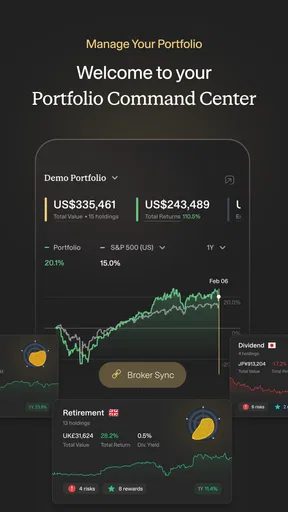
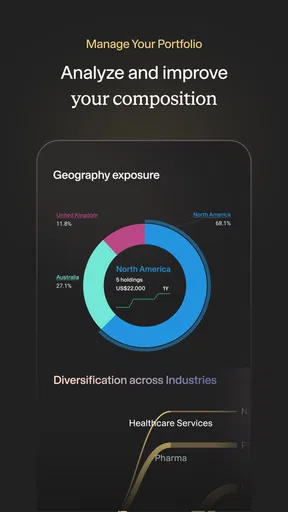
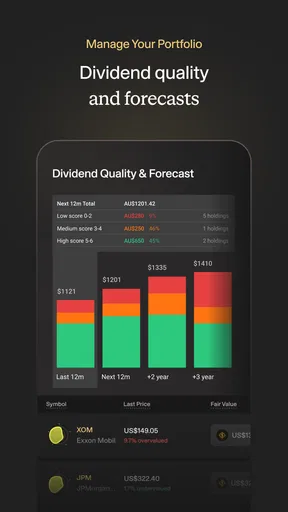
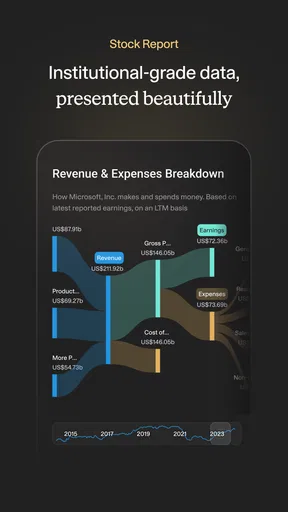


Our Review of Simply Wall St
 Analysis by Appyee
When I judge a finance app, I care less about how confident its charts look and more about whether I can understand what I’m seeing, check it against other sources, and stay in control of my own decisions. Simply Wall St is built around stock research and portfolio monitoring, so it can be a useful companion for investors who want a visual way to explore companies. I would treat it as a research aid, though, not as a substitute for my own checks or a promise about where a share price will go.
The app comes from Simply Wall St, is free to download, and has an average rating of 4.5 from around 8,400 ratings. It has been installed over 500,000 times, and its Everyone age rating makes it accessible to a broad audience. Those figures give a sense of its reach, but popularity alone does not tell me whether any particular analysis is right for my needs. I would still ask what a chart is showing, what assumptions sit behind a conclusion, and whether the information fits my investing timeframe.
A research tool, not an investing autopilot
Stock research can become overwhelming when company accounts, analyst opinions, market headlines, and price movements all compete for attention. Simply Wall St tries to make company analysis easier to scan by presenting information visually. That can help me notice a question worth investigating, but I would not let a polished graphic make the decision for me. A clear presentation is useful only when I can follow it up with careful reading and independent judgement.
This distinction matters most for newer investors. A visual breakdown can make unfamiliar topics feel more approachable, yet it cannot remove the uncertainty involved in buying shares. I would use the app to organize my questions: Is the business growing? What risks are being highlighted? How does this position fit with the rest of my portfolio? I would then verify important details before acting, rather than treating an attractive summary as a recommendation.
What I would check before sharing financial details
My trust in any finance app starts with practical questions: what information I choose to enter, what account controls are available, and whether I understand the purpose of a request. Simply Wall St lets users explore before adding a portfolio, which is a helpful way to look around before deciding whether to connect personal investing information to the experience. I like having the option to assess the research first instead of feeling that I must provide portfolio details immediately.
When setting up an account, I would pause at each sign-in choice and use the method I am comfortable managing. I would also avoid entering information simply because a screen makes it seem necessary for better insights. Portfolio data can be sensitive even when it is used for tracking, so I would think through what I want the app to display and whether I need to add every holding. I would review the available account and privacy controls directly in the app before relying on it for a detailed personal record.
That cautious approach is not a reason to avoid the app; it is ordinary care with financial information. I would keep account access protected, avoid sharing credentials, and be deliberate about any portfolio details I choose to enter. If I only want to study a company, exploring without building a complete portfolio may be enough. If I want a more personal tracking experience, I would first make sure I am comfortable with the information I am choosing to provide.
Using the analysis with care
I use a company analysis as a prompt for a second pass, not as a verdict. This section focuses on how I would turn a visual summary into a practical checklist: what to verify, which assumptions to question, and when another source is a better fit. That approach keeps the app useful without letting a neat presentation make an investment decision for me.
Getting Started with Simply Wall St
First things first, the setup is a breeze. After downloading Simply Wall St from the App Store or Google Play, you sign up using your email or social media account. Boom, you’re in! The user interface is super intuitive, with a clean design that’s easy on the eyes. No clutter, just straightforward navigation.
Once you're in, the app prompts you to set up your portfolio. Don't worry if you're not ready for this step yet—you can explore the app's features before diving into your personal investments. But, if you’re eager to get started, adding stocks is as simple as typing in the ticker symbol and letting the app do its magic.
In an everyday routine, I would use that flexibility to separate browsing from tracking. For example, if I hear about a company during the week, I can look it up to understand what the app emphasizes before deciding whether it belongs on a watchlist or in my portfolio. I would not add a holding just to make the app feel more complete. Keeping the portfolio accurate is more valuable than filling it with names I am only casually researching.
Delving into the Features
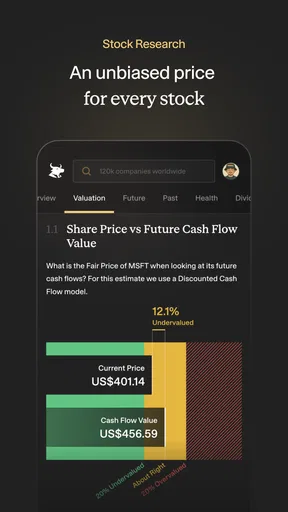
Alright, let's talk features because this app has plenty. One of the standout elements is the detailed company analysis. Each stock comes with an infographic report that’s both visually appealing and incredibly informative. Think of it as a snapshot that highlights a company’s financial health, dividend yield, and market performance.
What sets Simply Wall St apart is its focus on data visualization. The app uses graphs and charts to make complex financial data digestible. If you're a visual learner like me, you’ll appreciate how these infographics break down everything from balance sheets to cash flow summaries.
A useful way to read a company snapshot is to treat it as a map of topics, not a final score. I would first note what looks strong, then deliberately look for what does not fit that first impression. If a company appears appealing because of a growth story, I would also inspect the risk discussion and financial details rather than stopping at the headline graphic. This small habit helps prevent visual summaries from encouraging a one-sided view.
The same visuals can be less helpful when I need to answer a narrow accounting question or compare companies with unusual business models. In those cases, I would use the infographic to identify the relevant area, then go to more detailed company filings or another source for context. A chart can make a pattern easier to spot, but it may not explain why that pattern exists or whether it is likely to continue.
Stock Analysis Made Simple
Ever wish you had a crystal ball to predict stock performance? While Simply Wall St doesn’t exactly offer that, its analytical tools are the next best thing. The app provides a comprehensive analysis of each stock's future growth prospects, based on market trends and historical data. It's like having your own financial advisor whispering in your ear.
Another cool feature is the risk analysis. The app identifies potential red flags in a company’s financials, giving you a heads-up on what to watch out for. This feature alone can be a game-changer for anyone trying to make informed investment decisions.
I would be careful with the phrase “future growth prospects,” because any forward-looking view depends on assumptions and can change as a business or market changes. I find this kind of analysis most useful for generating follow-up questions, not for forecasting a sure outcome. If an outlook seems unusually reassuring, I would ask what would have to go right for it to happen and what could undermine it.
For a practical workflow, I would compare a company’s risk flags with my own reason for researching it. If I am interested because of dividends, I would not let a general growth picture distract me from checking whether the business and its financial position suit that goal. If I am considering a growth company, I would look beyond recent performance and think about how much uncertainty I am willing to accept. The app can help me organize that review, but my personal priorities still matter.
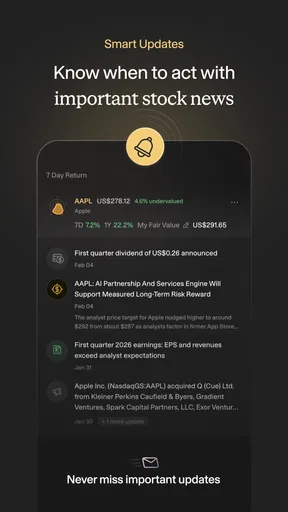
Alerts can also be useful when I want to follow developments without opening the app constantly. I would keep them focused on companies or changes that could affect a real decision, rather than turning every notification into a reason to trade. A reminder to review a holding is more valuable to me than reacting automatically to a short-term market move. Investors who prefer a quiet, hands-off routine may want to limit alerts and check their portfolio on a schedule instead.
Community and Learning Resources
Now, let’s get to the community aspect. Simply Wall St offers a platform for users to share insights and opinions on various stocks. This interactive element is fantastic for bouncing ideas off fellow investors. It's like having a mini stock market forum right in the app.
For those looking to brush up on their investment knowledge, the app also includes educational resources. Whether you’re trying to understand basic stock market principles or looking for advanced trading strategies, Simply Wall St has you covered with articles and guides.
I would treat community discussion as a source of questions rather than proof. A confident post can still reflect one person’s assumptions, priorities, or risk tolerance, none of which automatically match mine. When another user makes a persuasive case, I would look for the underlying reasoning and check it against company information. That habit lets me benefit from different perspectives without confusing popularity or certainty with evidence.
The app’s learning material may suit someone who wants to build familiarity while researching individual stocks. It is less likely to replace a structured course or detailed source material when I need to understand accounting or develop a disciplined investment plan. I would use an article to clarify a concept, then revisit the company analysis with that concept in mind. That makes learning active rather than simply scrolling through content.
Who benefits most, and where alternatives fit
I think Simply Wall St is best suited to people who want company-focused research presented in a visual format, especially investors who are building a portfolio and want a convenient way to revisit holdings. It may also help a curious beginner learn what questions to ask about a business. It is not the strongest fit for someone seeking only live price quotes, rapid trading tools, or a plain transaction ledger. A broker’s app is usually more appropriate for placing and managing trades, while a basic portfolio tracker may be simpler if all someone needs is a record of holdings and performance.
Compared with the usual alternatives, the main trade-off is depth of interpretation versus speed and simplicity. A brokerage app tends to put orders and account balances first; Simply Wall St puts company analysis and visual summaries closer to the center. A spreadsheet gives me full control over how I track investments, but I must build and maintain it myself. A dedicated news service may be better for following breaking events. I would choose based on the job I need done rather than expect one app to replace all of these tools.
The app is free to download, with in-app purchases ranging from $0.49 to $259.99 per item. I would check what a paid option includes and whether it solves a real problem for me before spending anything. Casual company research may not require an upgrade, while a user who relies on the app regularly may value additional capabilities if they are relevant. The key is to judge the benefit against my own workflow instead of assuming that a paid tier automatically means better investment decisions.
What to expect from the app over time
Simply Wall St is a finance app from Simply Wall St, and version 2.15.0 requires iOS 7.1 or later. It was released on April 19, 2016, and its current rating and broad reach suggest that many people have tried it, but an app’s usefulness still depends on how its tools fit a person’s habits. I would consider whether I want recurring portfolio reviews and company research, or whether I only need an occasional answer about one stock.
One practical question is whether I can use it without immediately committing to a full portfolio setup. I can explore before adding holdings, so I would start there if I were uncertain. Another is whether its analysis should guide a buy or sell decision on its own: in my view, no. It can help surface issues and organize research, but I would compare important conclusions with other reliable sources and my own plan. A third question is whether the community should influence a decision; I would listen for useful arguments, then verify them independently.
Final Thoughts
In a world where financial markets can seem intimidating, Simply Wall St demystifies investing with its user-friendly interface and comprehensive tools. Whether you’re new to investing or a seasoned pro, this app offers valuable insights that can help guide your financial decisions. It’s like having a trusty sidekick who’s always ready to provide guidance when you need it most.
So, if you’re ready to take control of your investment journey, give Simply Wall St a shot. The app’s blend of expert analysis and community interaction might be just what you need to confidently navigate the stock market.
My recommendation comes with a clear boundary: I would use it to make research more organized, not to outsource responsibility for financial choices. The visual company reports, risk prompts, and portfolio context can make a regular review feel less daunting, especially when I use them to guide deeper questions. At the same time, I would be selective about the financial information I enter, cautious with crowd opinions, and realistic about forecasts. If that sounds like the way you want to approach stock research, Simply Wall St is worth exploring; if you mainly want trading execution or a bare-bones tracker, another tool may serve you better.
Verdict
Strengths of Simply Wall St
- Comprehensive financial analysis tools.
- User-friendly interface for investors.
- Customizable watchlists for easy tracking.
- Detailed company insights and reports.
- Visual infographics simplify data understanding.
Limitations of Simply Wall St
- Limited features in the free version.
- Requires stable internet connection.
- Occasional syncing issues reported.
- Advanced features need a subscription.
- Mobile layout can feel cramped.
Similar Picks in This Category
View All
Google Wallet
Google LLC4.3

Airtel: Recharge, Bank & Loans
Airtel4.0

PayPal - Pay, Send, Save
PayPal Mobile4.2

DANA Indonesia Digital Wallet
PT Espay Debit Indonesia Koe4.5

Binance: Buy Bitcoin & Crypto
Binance Inc.4.8

Cash App
Block, Inc.4.7
Frequently Asked Questions
What is Simply Wall St and how does it work?
Simply Wall St is a financial analysis app designed to simplify investing for individual investors. It provides detailed stock reports and data visualization tools to help users make informed investment decisions. By leveraging algorithms and data from reliable sources, it translates complex financial data into easy-to-understand infographics.
Is Simply Wall St suitable for beginner investors?
Yes, Simply Wall St is designed with beginners in mind. The app uses visual representations to explain complex financial concepts, making it easier for those new to investing to understand stock market dynamics. Additionally, it offers educational content to help users learn the basics of investing.
What platforms is Simply Wall St available on?
Simply Wall St is available for both Android and iOS devices, offering seamless access to its features on the go. Users can download the app from the Google Play Store or the Apple App Store, ensuring compatibility with a wide range of smartphones and tablets.
Does Simply Wall St offer real-time stock data?
Simply Wall St provides updated data, but it may not be in real-time. The app focuses on providing detailed analysis and visualizations rather than minute-by-minute stock price updates. For real-time trading, users may need to complement Simply Wall St with other tools or platforms.
What are the subscription costs for Simply Wall St?
Simply Wall St offers a free version with limited features and a premium subscription for more in-depth analysis and additional tools. Pricing for the premium version varies, and users should check the app or website for the most current subscription rates and available features.
